Send Any Webhook to Discord
Lots of tools can send a webhook but can’t talk to Discord. Send Any Webhook to Discord sits in between. You give it an example of what the tool sends, map its fields onto a Discord message, and get a URL to paste into the tool. Every webhook that arrives is turned into a Discord message, sent with retries, and logged.
What you get
- A URL per relay, like
https://your-host/h/vikunja_k3J9xQp2LmT8…. It accepts JSON viaPOSTorPUT. - A sample payload: paste example JSON, paste a JSON Schema, or capture the next real webhook.
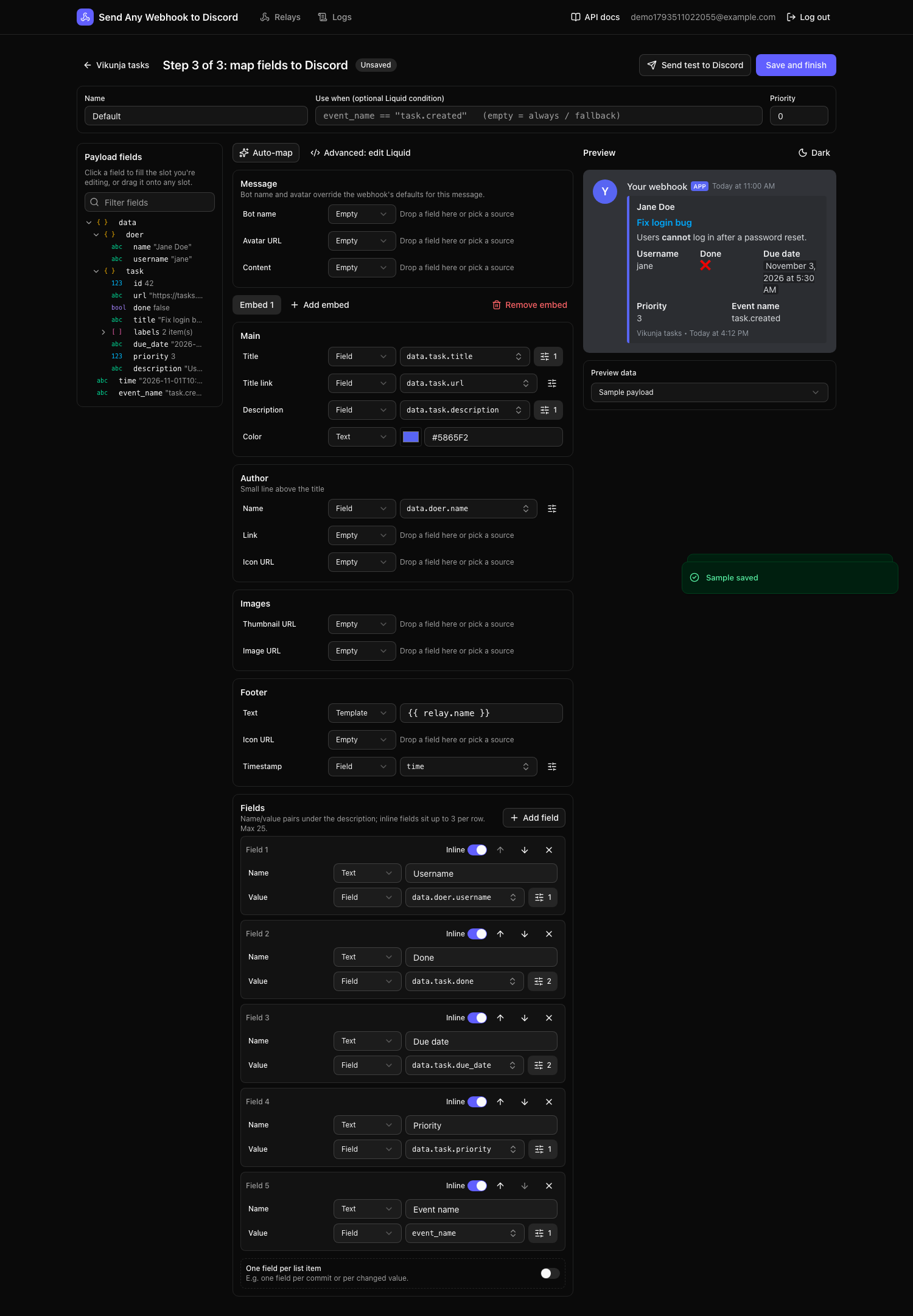
- A visual mapper: drag payload fields onto the title, description, color, author, fields and more. Format dates, join lists, map values to colors, and watch a Discord-style preview update as you type.
- Several templates per relay, chosen by conditions such as
event_name == "task.done". - A delivery queue: every webhook is stored first, then sent. Failures are retried with backoff, and Discord’s rate limits are respected.
- Logs: filter, sort and search everything received. Each entry shows the exact message sent, Discord’s response and any error with its stack trace. You can send now, retry, cancel or replay from the UI.
- Swagger API docs at
/docsfor everything the UI does.
How it works
 Service ── POST /h/<key> ──▶ Send Any Webhook to Discord ──▶ webhook_queue (Postgres) ──▶ worker ──▶ Discord webhook
            (JSON only)        202 Accepted                       render template,
                                                                   retry on failure,
                                                                   log every attempt
- The ingest endpoint checks that the body is JSON, stores it in the queue and answers
202immediately. Requests it refuses are logged too. - The worker picks up queued webhooks, chooses the first template whose condition matches, renders it, applies Discord’s limits and posts it.
- Each try is recorded as an attempt, so you can see exactly what happened.
Pages
| Page | What’s in it |
|---|---|
| Getting started | Run it with Docker and set up your first relay in five minutes |
| Configuration | Every environment variable |
| Guides | Relays, samples, the mapper, Liquid templates, logs and retries |
| Deployment | HTTPS, prebuilt images, backups, upgrades, scaling |
| API | Swagger, authentication, the ingest endpoint and curl examples |
| Development | Running from source, tests, migrations, project layout |
| Troubleshooting | Common errors and what they mean |